Webhook
How to Generate a Webhook Token (Raznar Panel)
The Webhook Token is created directly from the panel, with no additional configuration.
Steps
- Log in to the Raznar Panel
- Select the Server you want to enable CI/CD for
- Open the Git Deployment menu
- Enable the Enable Webhook option
When the webhook is enabled:
- Webhook URL will be created automatically
- Webhook Token will be generated automatically
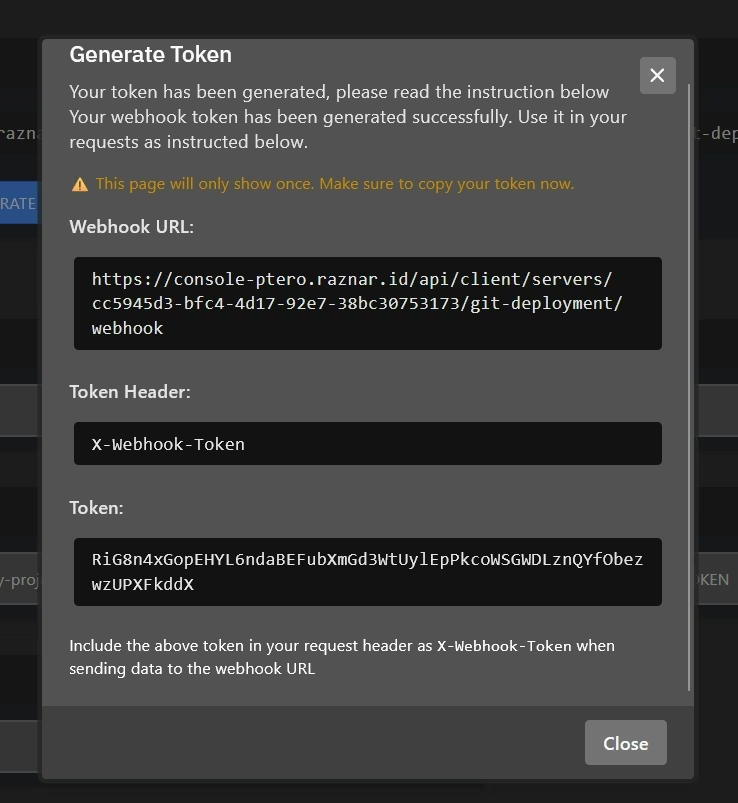
What to Copy
From the panel, copy and save:
- Webhook URL
- Webhook Token
Use those values as Secrets / Variables in CI/CD:
RAZNAR_WEBHOOK_URLRAZNAR_WEBHOOK_TOKEN
Notes
- The token must be sent via the
X-Webhook-Tokenheader - The token is only used by CI/CD (safe & controlled)
- If the token leaks, disable then re-enable the webhook to regenerate the token