Magical Smooth Numbers and Values
Configuration numbers and values that generally work for 80% of servers in the world.
A default value means you don't need to change it, whatever the initial value, just leave it as is.
You need to strive to achieve the Ideal value.
If you can't, aim for the Recommendation value.
If there's a Minimum, use it last. Avoid Minimum as much as possible because it affects players' gameplay experience. Its effect is sometimes enough to make people annoyed and quit!
Numbers and values not listed on this page are free for you to change as you like.
This page is written for Minecraft Java version 1.21.10. If there's an option that 'disappears', most likely that option has a different name or hasn't appeared in the version you're using.
server.properties
/home/container/server.properties
allow-flight:
Ideal: false and use an anticheat. A free one like Grim is enough.
Recommendation: true if your CPU isn't strong enough to run an anticheat.
network-compression-threshold:
Ideal: 128 if your CPU is strong but your network bandwidth is weak.
Recommendation: 512 if your network bandwidth is strong but your CPU is weak.
online-mode:
Ideal: true
Recommendation: true
You may set this to false so cracked players can enter the server.
You must install an authentication plugin like AuthMeReloaded or LibreLogin to avoid 'admin account hijacking'.
However you need to anticipate issues related to hybrid login cracked optional premium, such as with a floodgate account that is already linked but the server configuration isn't online mode (will result in duplicate UUIDs, one premium UUID and one cracked UUID).
op-permission-level=
Ideal: 0
Recommendation: 0
Minimum: 4
Avoid using the /op command. Use a permission plugin like LuckPerms, enable auto-op: true and give the luckperms.autoop permission to players who hold operator access.
function-permission-level=
Ideal: 0
Recommendation: 2
Minimum: 2
Use 2 if your server has a datapack. Because 0 will disable the datapack /function command.
Note: Avoid using datapacks. They often cause lag because they run on every tick, unlike plugins which are more event-driven.
spawn-protection=
Ideal: 0
Recommendation: 0
Minimum: 0
0 because most of the time this isn't used. Its function is to disable interaction with anything within a radius of number * number blocks from /setworldspawn
view-distance=
Ideal: 10
Recommendation: 8`
Minimum: 5
The view-distance value in server.properties or spigot.yml is the viewing distance and non-ticking chunks that will be sent to the client from the server world data.
Don't set the view-distance value smaller than simulation-distance! This will produce many visual bugs related to ticking!
Tips: If you use Paper server version 1.21+, you can use the ExtendedHorizons or BetterView plugin to send view distance chunks in the form of fake chunks to your players, so you can set view-distance +1 from simulation-distance, and farther chunks will be sent to your players. Fake Chunks sent through these plugins are much lighter than the real view distance because they're non-ticking and there's no loading process except caching. You can even set the viewing distance up to 32 blocks with 50 online players if you use ExtendedHorizons!
simulation-distance=
Ideal: 8
Recommendation: 5
Minimum: 4
The simulation-distance value in server.properties or spigot.yml is the chunk ticking distance.
Don't set the view-distance value smaller than simulation-distance! This will produce many visual bugs related to ticking!
bukkit.yml
/home/container/bukkit.yml
spawn-limits:
Ideal:
spawn-limits:
  monsters: 35
  animals: 10
  water-animals: 5
  water-ambient: 10
  water-underground-creature: 5
  axolotls: 5
  ambient: 0
Recommendation:
spawn-limits:
  monsters: 21
  animals: 8
  water-animals: 4
  water-ambient: 8
  water-underground-creature: 3
  axolotls: 5
  ambient: 0
monsters = all hostile mobs.
animals = all passive mobs.
water-animals = squid, dolphin.
water-ambient = tropical fish, cod, salmon.
water-underground-creature = glow squid.
axolotl = axolotl.
ambient = bat. Unless your server has a use for bat mobs, just set it to 0, because bats have no function or contribution whatsoever.
ticks-per:
Ideal:
ticks-per:
  animal-spawns: 400
  monster-spawns: 2
  water-spawns: 2
  water-ambient-spawns: 2
  water-underground-creature-spawns: 2
  axolotl-spawns: 2
  ambient-spawns: 0
  autosave: 6000
Recommendation:
ticks-per:
  animal-spawns: 400
  monster-spawns: 3
  water-spawns: 3
  water-ambient-spawns: 3
  water-underground-creature-spawns: 3
  axolotl-spawns: 3
  ambient-spawns: 0
  autosave: 6000
monsters = all hostile mobs.
animals = all passive mobs.
water-animals = squid, dolphin.
water-ambient = tropical fish, cod, salmon.
water-underground-creature = glow squid.
axolotl = axolotl.
ambient = bat. Unless your server has a use for bat mobs, just set it to 0, because bats have no function or contribution whatsoever.
spigot.yml
/home/container/spigot.yml
timeout-time:
Ideal: 60
Recommendation: 60-120
Minimum: 60
This is the 'wait time' if the server freezes/hangs/stalls, before the server tries to dump threads in the console and force-restart the server.
Sometimes there are heavy commands like /minecraft:locate that can freeze the main thread for several minutes, and eventually the server crashes. Increasing this value will produce a longer 'wait time'.
Preferably don't use the /locate or /minecraft:locate command
attribute:
Ideal: default
Recommendation: default
Minimum: default
MAXIMUM: 8192
Leave everything at the default numbers (2048 and 1024) unless you have a server where mobs or players can exceed 1024 hearts (2048 hp), then change maxHealth: max: 2048 to a higher value.
Don't exceed the maximum value (8192)!
world-settings.default.option-name-you-can-set:
All options inside default will be applied to all worlds. You can create a new entry and replace default with a specific world name, so you can change specific options only in that world, and have higher priority than the options you set in default.
below-zero-generation-in-existing-chunks:
Ideal: false
Recommendation false
Not used if you don't have or import a 1.17 or below world on a 1.18+ server.
mob-spawn-range:
Ideal: Simulation distance minus 1
Example: in server.properties, simulation distance= is 5, then mob-spawn-range: 4 because 5-1 = 4.
Why must it be minus 1?
This gives room for mobs to be able to despawn. because if mob-spawn-range == simulation-distance, then there's a chance some mobs can't despawn because their chunk is already unloaded, so they'll fill up the player's or world's mob cap. As a result the world is guaranteed to become empty because of mobs that failed to despawn and got stuck.
You also need to change despawn-range-shape and despawn-ranges! Further explanation is in the paper-world-defaults.yml configuration guide below.
entity-tracking-range:
Ideal:
    entity-tracking-range:
      players: 128
      animals: 96
      monsters: 96
      misc: 96
      display: 128
      other: 64
Recommendation:
    entity-tracking-range:
      players: 64
      animals: 32
      monsters: 48
      misc: 96
      display: 128
      other: 48
The numbers in Recommendation: must also be adjusted in the Paper configuration section tracking-range-y:. You'll find the numbers on this page in the paper-world-defaults.yml section.
growth:
Ideal: default
Recommendation: default
Minimum: 1
Specifically for cactus and sugarcane: 100
Many servers change the numbers here to slow down plant growth, the gain from slowing this down isn't much, but it can affect players' gameplay experience.
Besides that, there's also a well-known fairly old spigot bug, namely issue#8544 pr#12264 which causes cactus and sugarcane to not trigger a block update and not break when hit by an adjacent block when they grow.
entity-activation-range:
Ideal:
	entity-activation-range:
      animals: 32
      monsters: 32
      raiders: 64
      misc: 80
      water: 16
      villagers: 32
      flying-monsters: 40
Recommendation:
	entity-activation-range:
      animals: 24
      monsters: 32
      raiders: 64
      misc: 64
      water: 16
      villagers: 32
      flying-monsters: 32
Note: misc is minecart, boat, item frame, painting, block display, text display, entity display, evoker fang, and others. Don't set misc too close, or your players' farms that rely on Hopper Minecarts will break!
ticks-per and hopper-amount:
Ideal:
    ticks-per:
      hopper-transfer: 8
      hopper-check: 1
    hopper-amount: 1
Recommendation:
    ticks-per:
      hopper-transfer: 24
      hopper-check: 3
    hopper-amount: 3
Minimum:
    ticks-per:
      hopper-transfer: 45
      hopper-check: 5
    hopper-amount: 5
This is one of the sections that is most frequently misconfigured. hopper-transfer may only be changed in multiples of 8, hopper-check and hopper-amount may only be changed in multiples of 1. If they don't match, the hopper ticking on your server will be broken.
One of the most fatal consequences of misconfiguring this section is that every auto sort system that uses hoppers and comparators will definitely have some hopper columns that are completely inactive.
hopper-can-load-chunks::
Ideal: true
Recommendation: false
Only useful for chunk loaders. If your server is strong and many players are technical, then you may enable this. But for most servers, enabling this option will let your players make chunk loaders that can potentially consume quite a lot of server ticks, depending on the contents of the chunk loaded.
Besides this option, vanilla Minecraft has also provided a chunk loader option using thrown ender pearls. The ender pearl option can also be disabled in the paper config.
paper-world-defaults.yml
/home/container/config/paper-world-defaults.yml
Everything in paper-world-defaults.yml will be applied to all worlds. You can take advantage of this logic to make world-specific configurations.
World-specific configurations are stored inside each world's folder name under the name paper-world.yml. Example: /home/container/world_nether/paper-world.yml or /home/container/spawn_server_yang_keren_dan_luas_banget/paper-world.yml.
anticheat.anti-xray:
Differences of each engine-mode:
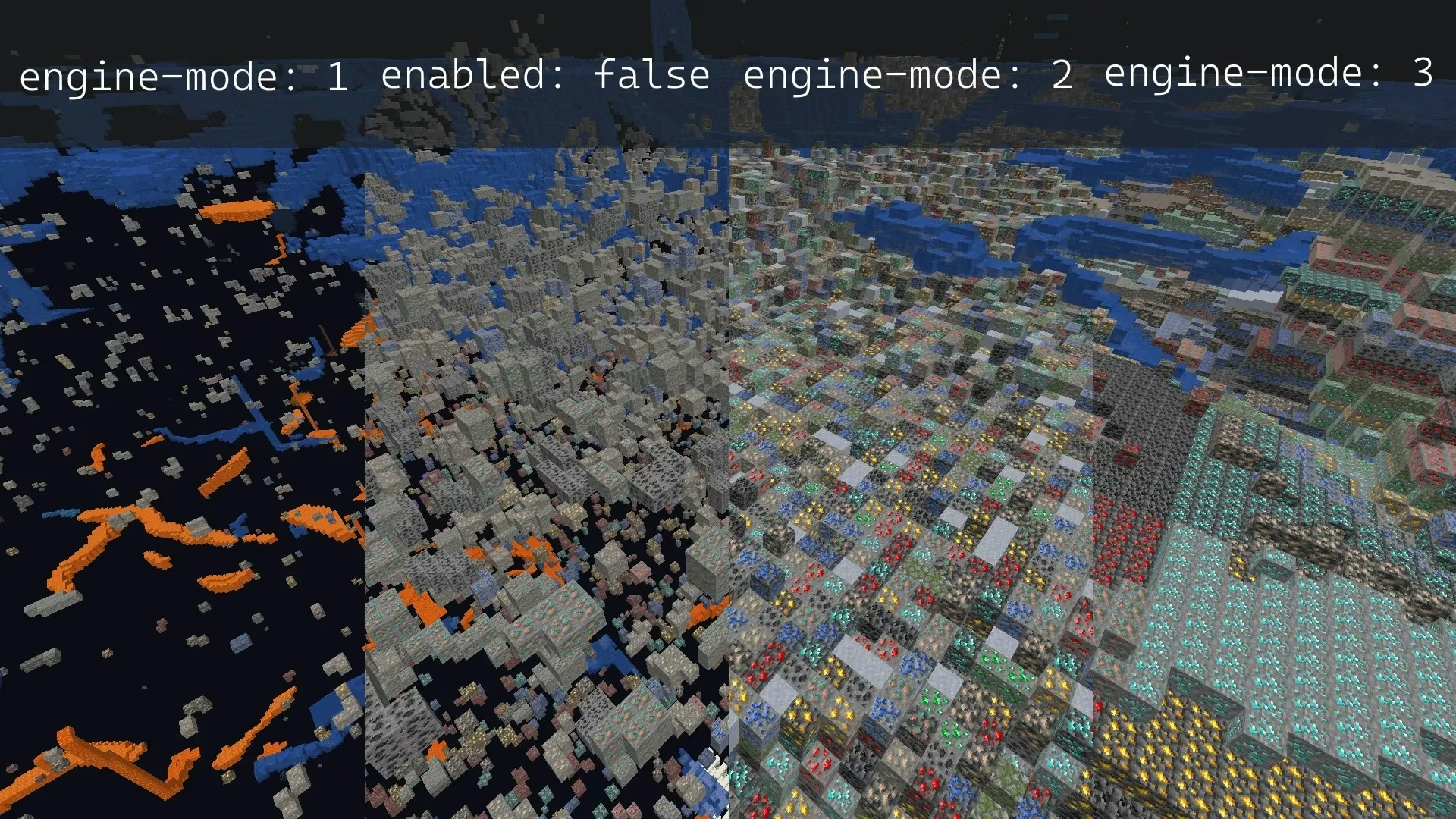
For the world or Overworld world:
/home/container/world/paper-world.yml. The /world/ folder location matches your Overworld world folder name! The world where your players play, whether it's a resource world or a build world.
Ideal: engine-mode 2
anticheat:
  anti-xray:
    enabled: true
    engine-mode: 2
    hidden-blocks:
    - copper_ore
    - deepslate_copper_ore
    - raw_copper_block
    - diamond_ore
    - deepslate_diamond_ore
    - gold_ore
    - deepslate_gold_ore
    - iron_ore
    - deepslate_iron_ore
    - raw_iron_block
    - lapis_ore
    - deepslate_lapis_ore
    - redstone_ore
    - deepslate_redstone_ore
    lava-obscures: false
    max-block-height: 64
    replacement-blocks:
    - chest
    - amethyst_block
    - andesite
    - budding_amethyst
    - calcite
    - coal_ore
    - deepslate_coal_ore
    - deepslate
    - diorite
    - dirt
    - emerald_ore
    - deepslate_emerald_ore
    - granite
    - gravel
    - oak_planks
    - smooth_basalt
    - stone
    - tuff
    update-radius: 2
    use-permission: false
Recommendation: engine-mode 3
anticheat:
  anti-xray:
    enabled: true
    engine-mode: 3
    hidden-blocks:
    - copper_ore
    - deepslate_copper_ore
    - raw_copper_block
    - diamond_ore
    - deepslate_diamond_ore
    - gold_ore
    - deepslate_gold_ore
    - iron_ore
    - deepslate_iron_ore
    - raw_iron_block
    - lapis_ore
    - deepslate_lapis_ore
    - redstone_ore
    - deepslate_redstone_ore
    lava-obscures: false
    max-block-height: 64
    replacement-blocks:
    - chest
    - amethyst_block
    - andesite
    - budding_amethyst
    - calcite
    - coal_ore
    - deepslate_coal_ore
    - deepslate
    - diorite
    - dirt
    - emerald_ore
    - deepslate_emerald_ore
    - granite
    - gravel
    - oak_planks
    - smooth_basalt
    - stone
    - tuff
    update-radius: 2
    use-permission: false
Minimum: engine-mode 1
anticheat:
  anti-xray:
    enabled: true
    engine-mode: 1
    hidden-blocks:
    - chest
    - coal_ore
    - deepslate_coal_ore
    - copper_ore
    - deepslate_copper_ore
    - raw_copper_block
    - diamond_ore
    - deepslate_diamond_ore
    - emerald_ore
    - deepslate_emerald_ore
    - gold_ore
    - deepslate_gold_ore
    - iron_ore
    - deepslate_iron_ore
    - raw_iron_block
    - lapis_ore
    - deepslate_lapis_ore
    - redstone_ore
    - deepslate_redstone_ore
    lava-obscures: false
    max-block-height: 64
    replacement-blocks: []
    update-radius: 2
    use-permission: false
Important note: Only use engine-mode: 2 if your server has high bandwidth, a strong CPU, and stable player connections. Because engine-mode: 2 is very resource intensive. Use engine-mode: 3 first before engine-mode: 2!
Important note: don't add the air block to hidden-blocks no matter which engine-mode you use!!! This is not the block air = water, but air = udara, and this will consume server bandwidth and server CPU. Besides that it will also make your players with unstable connections become very laggy when entering the server or switching worlds!!!
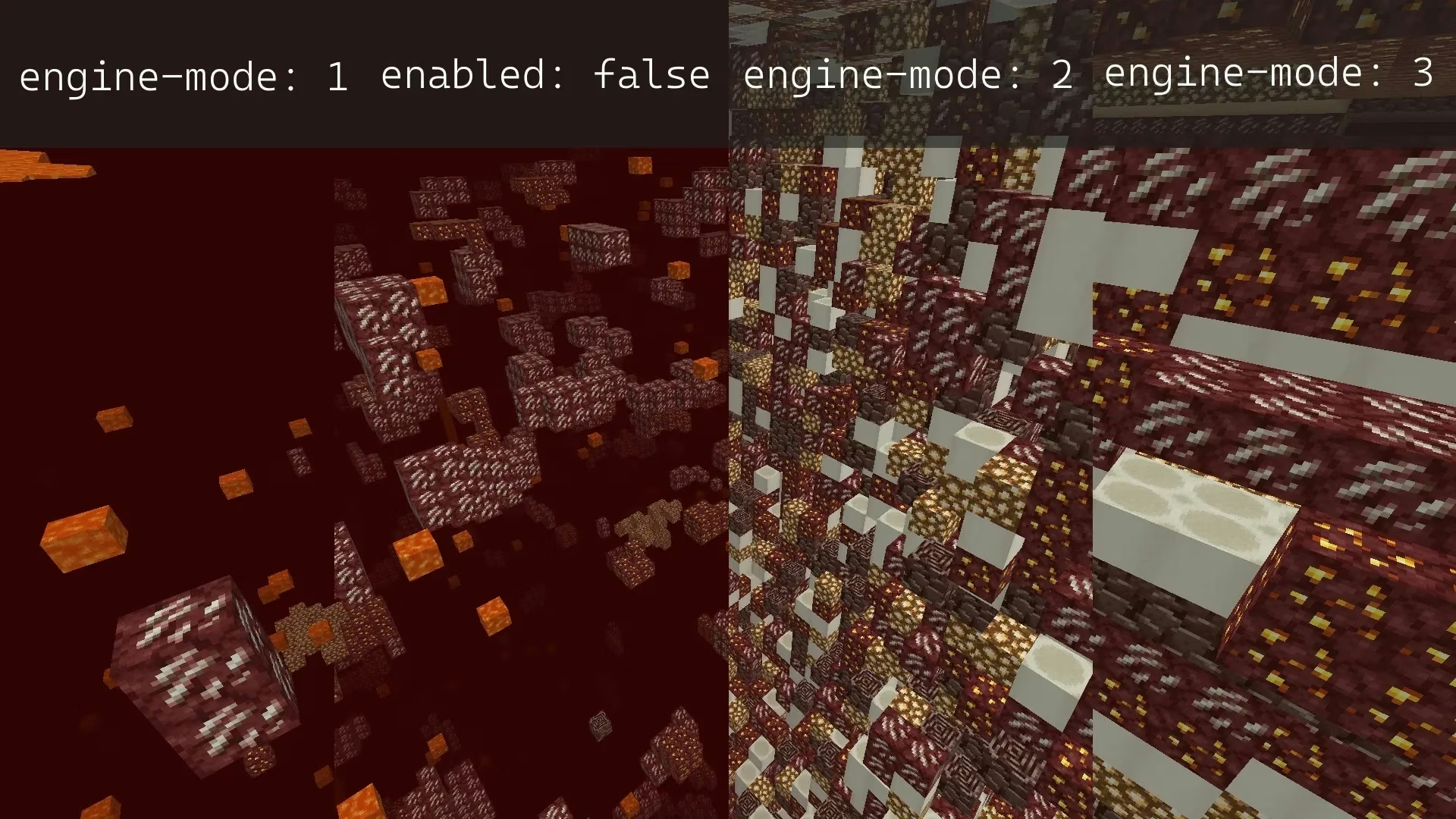
For the world_nether or The Nether world:
/home/container/world_nether/paper-world.yml The /world_nether/ folder location matches your The Nether world folder name! The world where your players play, whether it's a resource world or a build world.
Ideal: engine-mode: 1
anticheat:
  anti-xray:
    enabled: true
    engine-mode: 1
    hidden-blocks:
    - ancient_debris
    - nether_gold_ore
    - nether_quartz_ore
    lava-obscures: false
    max-block-height: 128
    replacement-blocks: []
    update-radius: 2
    use-permission: false
No need for engine-mode: 1 or 3, because Ancient Debris will always generate surrounded by full blocks. So Ancient Debris will always be hidden by anti-xray.
Important note: don't add the air block to hidden-blocks no matter which engine-mode you use!!! This is not the block air = water, but air = udara, and this will consume server bandwidth and server CPU. Besides that it will also make your players with unstable connections become very laggy when entering the server or switching worlds!!!
For the world_the_end or The End world:
/home/container/world_the_end/paper-world.yml The /world_the_end/ folder location matches your The End world folder name! The world where your players play, whether it's a resource world or a build world.
Ideal: disabled entirely.
anticheat:
  anti-xray:
    enabled: false
There is no ore in The End world.
Important note: don't add the air block to hidden-blocks no matter which engine-mode you use!!! This is not the block air = water, but air = udara, and this will consume server bandwidth and server CPU. Besides that it will also make your players with unstable connections become very laggy when entering the server or switching worlds!!!
chunks.delay-chunk-unloads-by:
Ideal: 1s
Recommendation: 5s
The default is 10s. This number means the server doesn't need to continuously load-unload chunks if the majority of your players just wander around the same area. If set too high, then RAM usage will increase drastically, especially when your players are exploring the world.
Important note: don't set it to 0s! Mobs won't be able to despawn because the chunk has already been unloaded, and mobs that don't despawn will use up the per-player and per-world mob cap quota, so in the end the world will become emptier!
chunks.prevent-moving-into-unloaded-chunks:
Ideal: true
Enable if you want your players to not explore the world too fast. A server CPU that isn't strong enough can enable this option.
Chunk loading has a fairly high priority among other server tasks. If a player uses an elytra quickly, they'll load a huge number of chunks.
entities.despawn-ranges:
Ideal:
    despawn-range-shape: CYLINDER
    despawn-ranges:
      monster:
        hard:
		  horizontal: default
		  vertical: 128
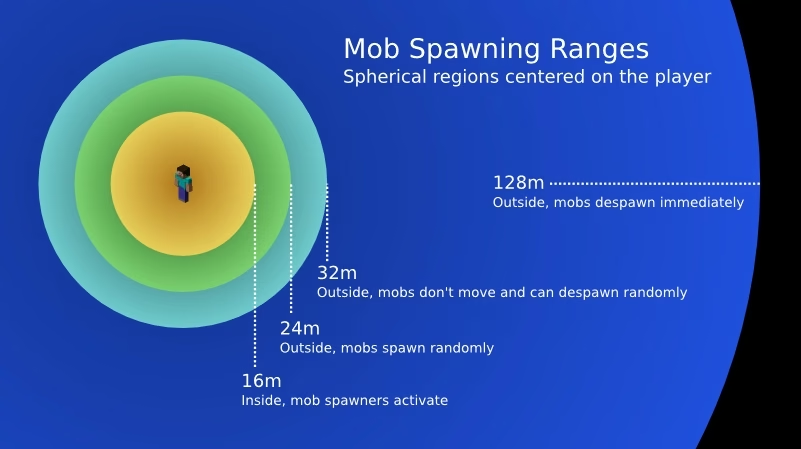
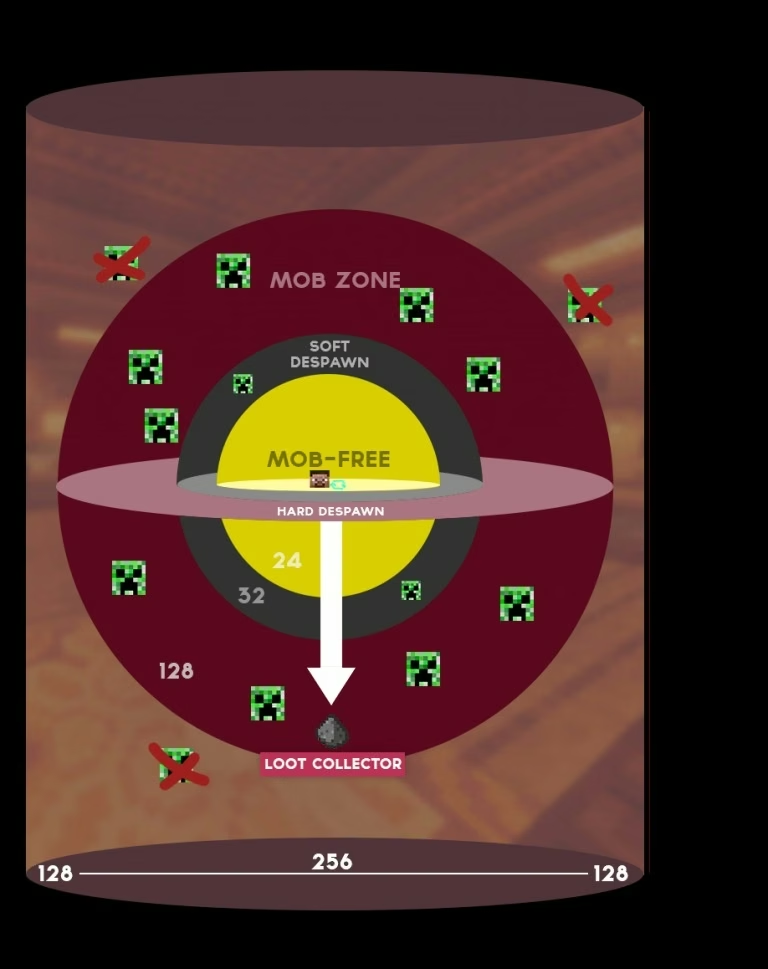
Change the default in horizontal: default to mob-spawn-range*16 with a minimum number of 32. Example: mob-spawn-range=5, then horizontal: 80.
Must be combined with mob-spawn-range in spigot.yml!
This is used so that no player-made mob farm breaks. 128 is the vanilla Minecraft hard despawn range. Most players only copy-paste farm designs from YouTube, and if you don't do anything about this setting, your players' mob farms that prioritize a 128 block distance to AFK from the killing chamber will definitely break. Because mobs will despawn before reaching block 120+, due to the default despawn-range following the mob-spawn-range distance.
By limiting simulation-distance and mob-spawn-range to a distance smaller than 8 chunks, you can get a world that is more "mob-crowded" without sacrificing much CPU performance. But make sure you still change the vertical hard monster despawn range and change its shape to CYLINDER to avoid what was already written before.
entities.tracking-range-y:
Combine with spigot.yml - world-settings.entity-tracking-range:.
Recommendation: true
Follow the Recommendation of entity-tracking-range: in spigot.yml written earlier, then use these numbers.
  tracking-range-y:
    enabled: true
    animals: 64
    display: 80
    misc: 128
    monsters: 128
    other: 64
    players: 128
environment.optimize-explosions:
Ideal: optimize-explosions: true
This will make any explosion done in succession and many at once lighter. Example: Detonating hundreds of TNT at once.
You may want to increase the max-tnt-per-tick number in spigot.yml if consecutive TNT explosions feel slower than vanilla.
lootables:
Ideal:
lootables:
  auto-replenish: true
Leave the other numbers and values in this option as they are.
auto-replenish: true will solve item scarcity problems like Heart of The Sea and avoid things like "oh man, this server has a new structure crisis, all the structures have been looted."
restrict-pemain-reloot: true will limit your players so they can only open the same loot chest / loot container once, to avoid exploits.
tick-rates:
Ideal:
tick-rates:
  behavior:
    villager:
      validatenearbypoi: -1
  container-update: 1
  dry-farmland: 1
  grass-spread: 1
  mob-spawner: 1
  sensor:
    villager:
      secondarypoisensor: 40
  wet-farmland: 1
Recommendation:
tick-rates:
  behavior:
    villager:
      validatenearbypoi: 20
      acquirepoi: 20
  container-update: 3
  dry-farmland: 3
  grass-spread: 3
  mob-spawner: 2
  sensor:
    villager:
      secondarypoisensor: 40
  wet-farmland: 3
Important note: Don't set validatenearbypoi and acquirepoi too high or your Villagers will take a long time to take their jobs at the nearest block!
Don't set secondarypoisensor too high or your Villagers will work very slowly!
Don't change other sensors or behaviors of villagers if you don't understand their function! Because most likely the Villagers won't work as they should.
If Villagers make your server lag, especially if a player makes a large-scale villager trading station, then the solution you can use is to install the VillagerLobotomizer plugin to disable villager AI if they're detected being 'confined' at a trading station, and Villagers that are lobotomized won't be affected by wake-up-inactive in spigot.yml, but their trade refresh will still work because this plugin will periodically trigger Villager trade refresh.
misc.redstone-implementation:
Ideal: ALTERNATE-CURRENT
Recommendation: Check the note.
There are other options like EIGENCRAFT. However the ALTERNATE-CURRENT redstone algorithm is far lighter, especially for redstone dust which is changed to non-locational updates. The quasi-connectivity bug of ALTERNATE_CURRENT has also been fixed (issue#7852) pr#7971 fix issue #7852), so there's minimal chance of redstone bugs as long as you configure other redstone-related things correctly.
Note: ALTERNATE_CURRENT can potentially make TNT duplicators that use block updates not work (issue#23). If your server allows and enables TNT dupe, you need to change ALTERNATE_CURRENT to EIGENCRAFT.
Technical information on ALTERNATE_CURRENT can be accessed on the Alternate Current page.
References:
Paper-chan. Paper Chan's Little Guide to Minecraft Server Optimization!
Last Edited: 9 January 2026.
Author: Jan Wafa Karsiena. License: CC BY-SA 4.0.
