Connecting a Domain to the Server (Without a Numeric IP)
The situation: You get a server address from Raznar in the form of a subdomain like game-gnl-jh2.raznar.net (not a numeric IP like 192.168.1.1).
For this case, we must use a CNAME Record. However, since there is a port 25191 (not the default 25565), we have two options for how to set it up.
Without a Subdomain
First, you must have a domain already; if you don't, you have to buy one from a Seller — the point is you need to have one first.
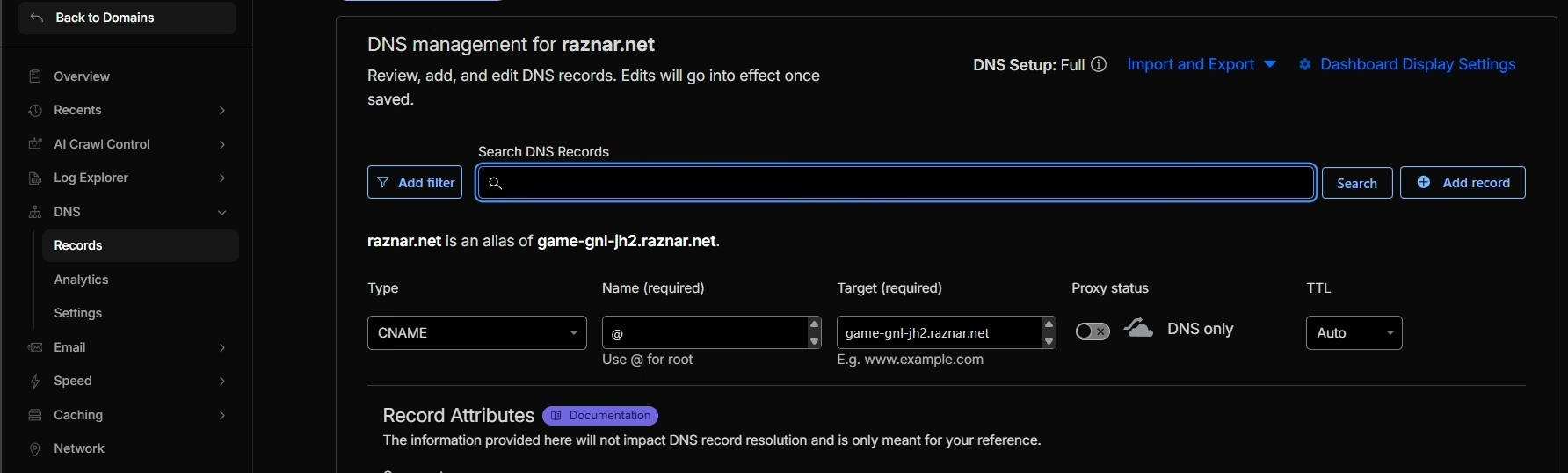
1. Create a "Bridge" (CNAME)
Here we'll use the server IP Address game-gnl-jh2.raznar.net:25191 as an example and connect it to the domain, so players don't have to type something long.
- Click Add Record:
- Type:
CNAME - Name:
@or in other words, root
- Target:
game-gnl-jh2.raznar.netfill in with our server IP Address from earlier, without the Port
- Proxy Status: DNS Only (Gray Cloud).
- Type:
- Click Save.
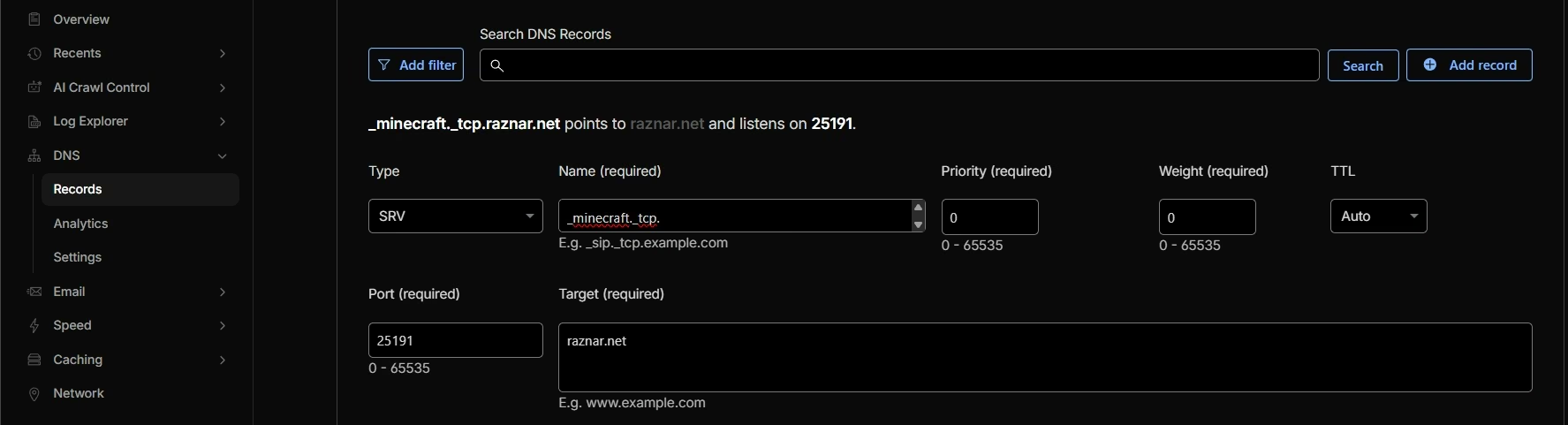
2. Create a Port Forwarder (SRV Record)
Now, since we don't have the default port (25565/19132), we must add a record, which is SRV.
-
Click Add Record again.
-
Change the Type to
SRV. -
Fill in the form (it's a bit long, be careful):
- Name:
_minecraft._tcp. - TTL: Auto
- Priority:
0 - Weight:
0 - Port:
25191Enter your Raznar server port here.
- Target:
raznar.netfill in with your domain; the example we're using here is
raznar.net
- Name:
-
Click Save.
Result:
Now players can join your server just by typing: raznar.net.
With a Subdomain
Above we successfully connected the server with the domain we own; now I want to teach you how to connect a domain but with a subdomain.
What is a subdomain? A subdomain is an additional part of the main domain that sits before the main domain name [subdomain].mydomain.com. For example mc.raznar.net, so it sits before the main domain.
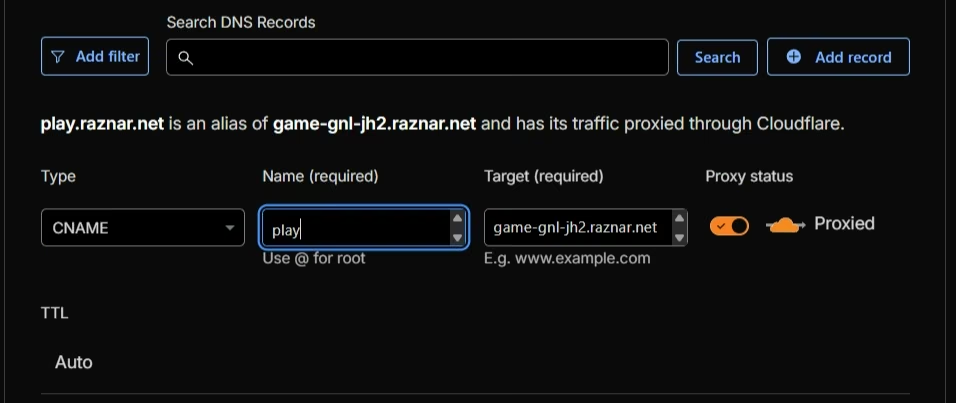
1. Create a "Bridge" (CNAME)
Here we'll use the server IP Address game-gnl-jh2.raznar.net:25191 as an example.
- Click Add Record:
- Type:
CNAME - Name:
play*This is where we put the subdomain; for the example we use the subdomain
play - Target:
game-gnl-jh2.raznar.netfill in with our server IP Address from earlier, without the Port
- Proxy Status: DNS Only (Gray Cloud).
- Type:
- Click Save.
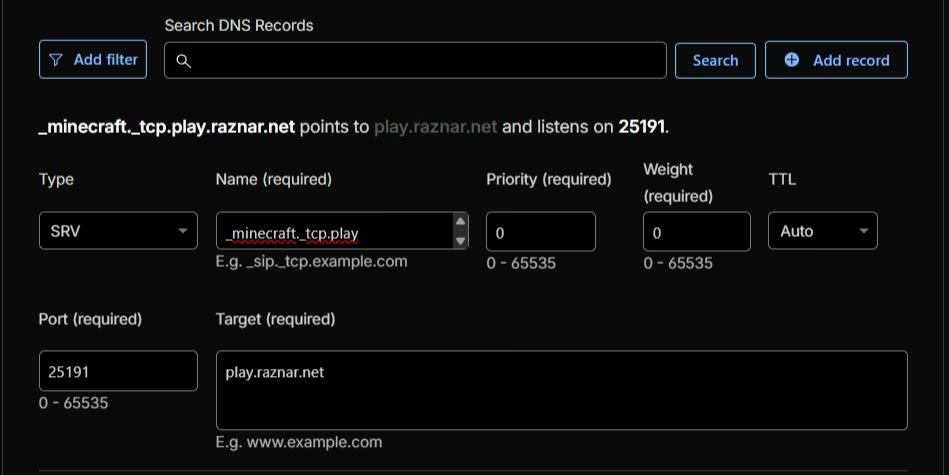
2. Create a Port Forwarder (SRV Record)
Now, since we don't have the default port (25565/19132), we must add a record, which is SRV.
-
Click Add Record again.
-
Change the Type to
SRV. -
Fill in the form (it's a bit long, be careful):
- Name:
_minecraft._tcp.play_minecraft._tcp.[subdomain] - TTL: Auto
- Priority:
0 - Weight:
0 - Port:
25191Enter your Raznar server port here.
- Target:
play.raznar.netfill in with your domain; the example we're using here is
play.raznar.net
- Name:
-
Click Save.
Result:
Now players can join your server just by typing: play.raznar.net.
The port for bedrock(19200-19400) doesn't need an SRV record because it's already automatic from the server, so you only need to create a record for the java port(25000-25200). Just fill it in with the domain you've created and enter the special bedrock port in the Minecraft Client.