Changing the Server Software (Egg)
This guide explains the steps to change the server software (egg) through the hosting panel, for example from Paper to Fabric. This process will delete the old server files and install the new software automatically.
Prerequisites
- Access to the server hosting panel
- Knowing the name of the server being used
- Backing up data if you want to keep files from the previous software
Steps
1. Stop the Server
Before making changes, stop the server first through the panel:
Click the "Stop" button on the server's main page
2. Delete All Server Files
Go to the File Manager or Files tab:
- Check all files and folders in the server's main directory
- Click the Delete button to delete the entire server contents
Note: If you want to keep data from the previous software (for example Paper), download a backup first before deleting.
3. Choose the New Software
Go to the Startup or Software Settings tab:
- Find the Select Egg / Software section
- Choose the new software you want, for example:
Fabric
- Confirm by typing the server name according to the panel configuration
Example:
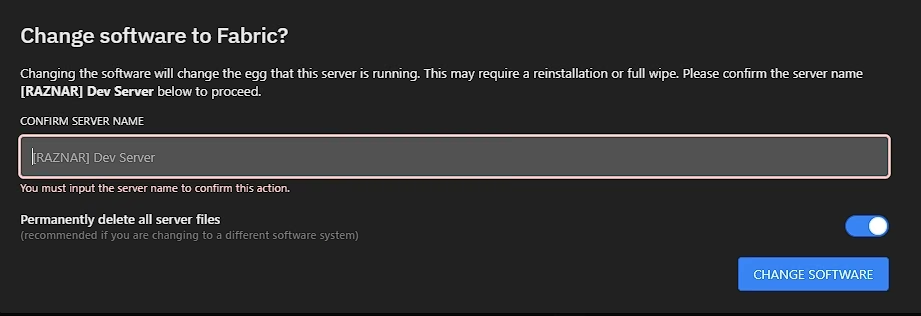 Click the CHANGE SOFTWARE button
4. Automatic Installation
If successful, the server will automatically download and install the new software (Fabric). Wait until the process finishes, then click Start to run the server with the new software.
Additional Tips
- Make sure the software you choose is compatible with the Minecraft version you want
- Some software requires additional configuration after installation (for example a mod loader or plugin manager)
- Keep regular backups before making major changes