Bad Habits and Common Misconceptions
The following are the bad habits and common misconceptions most frequently encountered by server administrators in Indonesia
Lots of RAM = Smooth Server
Not quite right. RAM does contribute greatly to temporary data storage such as loaded chunks, plugin caches, running server plugins, and others related to RAM's own function (storing temporary data).
The ideal RAM for all servers is 8 GB to 24 GB
Beyond that, it's strongly recommended to limit the maximum player slots. The potential problems that arise from using more than 24 GB of RAM aren't worth-it compared to limiting max player slots, or creating a second server.
Most servers will run very well with 16 GB of RAM.
The key is a strong single-thread* CPU with many cores, plus the server's disk read/write speed, not high RAM capacity!
Tips: You can sell access to bypass the max player slot limit :)
*Specific to Paper and its derivatives. Folia wants stronger multi-threading performance.
Full RAM = Server Lag, Crash, Freeze, Hang
Not quite right. In fact, the good thing is to utilize 95% of the RAM you have. Suppose you rent 12 GB of RAM, then 95% of 12 GB is 11.4 GB. Use all of that 11.4 GB with no free space left except that 600 MB (5%). Why rent 12 GB of RAM if you only use 8 GB? It's a shame the money isn't used to the maximum.
Maximized RAM will smooth out chunk loading, chunk generation, stabilize plugin performance, and make the server CPU work as it should.
A server is a single unit made up of RAM, CPU, disk storage, power, and temperature. If one of them can't keep up with the server's needs, the impact is the server becomes laggy.
The various common reasons that cause full RAM, such as using a huge number of mods, plugins or datapacks that run on every tick, and others, are not signs of insufficient RAM, but rather poor optimization and a server specification choice that can't cover your server's needs.
Why Utilize 95% of RAM?
Because the remaining 5% is a 'reserve'. For the garbage collection process (memory cleanup), for some cache, and so the server doesn't get hit by the out of memory killer.
A good server host will provide memory overhead to minimize the OOM killer and for the panel's allotment.
Sudden High RAM = Memory Leak
Not quite right. Still related to the previous discussion, a memory leak usually occurs when heap memory doesn't come down and keeps increasing over time until the server is restarted
For most server administrators who use a server panel, it's hard to see a memory leak unless you do a heap memory dump and analyze it with a memory profiler like Eclipse Memory Analyzer.
Heap memory is the actual RAM used by the Minecraft server only.
Process memory is the RAM memory allotted by Java to be used by the Minecraft server system.
On the pterodactyl panel, the RAM shown is process memory. If you see RAM from spark or a placeholder like %server_ram_used, that is heap memory.
On the server panel, if you allocate 16 GB of RAM in -XMX16G, but you only see RAM usage of around 2 GB to 4 GB in a sawtooth pattern or a constant straight line, that is the heap memory. That's the only amount of RAM actually used by the Minecraft server.
The rest? Idle. Therefore you should match -Xms with -Xmx and use Aikar's G1GC flag for your Minecraft server.
A good server host will not make your server crash/freeze due to using this flag, and will not reduce the RAM capacity you've already bought.
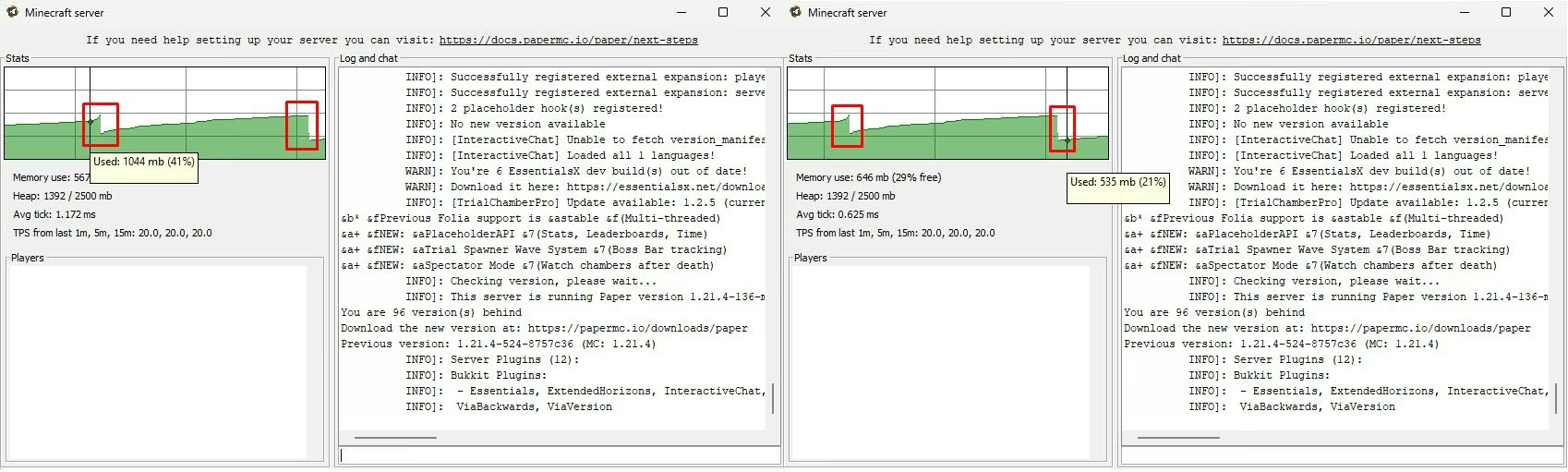 Image: Memory usage without Aikar's flags,
 -Xms256M -Xmx2500M -jar server.jar --nogui
In the image above, in the red box you can see a sawtooth-shaped pattern. Every dip that appears after memory usage increases indicates the garbage collection process is working. At that time the RAM that has build-up gets cleaned up.
With Aikar's G1GC flags, the sawtooth-shaped line will look straight, though it can drop little by little slowly, unlike the default flag that only uses -Xms -Xmx -jar server.jar --nogui.
With the default flag (-Xms -Xmx -jar server.jar --nogui only), as a small side effect of -Xms being smaller than -Xmx, there's a potential for MSPT to rise above 50 when GC is performed or when the server adds heap. You, who have painstakingly searched for the cause of the lag spike via the spark profiler, find out that in the end the lag spike comes from the GC process. Annoying, isn't it?
Alternative to Aikar's G1GC flags: Generational ZGC
Requirement: Java 21
Flag: java -XmsRAM_DALAM_MEGABYTE_M -XmxRAM_DALAM_MEGABYTE_M -XX:+UseZGC -XX:+ZGenerational -jar server.jar --nogui
Make sure the -Xms value equals -Xmx
Copy-Pasting 'Server Optimization' Guides
Example: You fully copy-paste the numbers in an optimization guide such as the guide by YouHaveTrouble WITHOUT understanding the meaning and impact of each number you change.
This can potentially break vanilla mechanics. Author's comment: your players are guaranteed to complain about mob farms that don't work.
Player gameplay experience matters more than saving budget.
Also, every server has different computing capabilities and needs.
In the guide page "Setelan Ajaib Lancar" there are numbers and values that are usually enough for 80% of servers in the world, but you also need to do your own fine tuning.
ClearLag
Avoid ClearLag.
There is no reason* to use ClearLag if you use Paper and its derivatives.
Why?
Because Indonesian server administrators generally use ClearLag to force-despawn items scattered on the ground, better known as 'deleting trash' or 'deleting ground items'.
This is no longer needed if you use a Paper server. Especially above 1.20+, and even better if your server uses version 1.21+. All scattered items and xp orbs no longer cause lag compared to earlier versions because Mojang itself has done a lot of more aggressive optimization throughout version 1.20 up to the latest version.
What's the replacement?
Use alt-item-despawn-rate in the Paper config!
/home/container/config/paper-world-defaults.yml - entities.spawning.alt-item-despawn-rate:
alt-item-despawn-rate:
  enabled: true
  items:
    cobblestone: 600
    cobbled_deepslate: 600
    netherrack: 600
    rotten_flesh: 900
    ender_pearl: 900
    leather: 900
    bone: 1200
    bone_meal: 1200
    cactus: 900
    egg: 900
    feather: 900
    gunpowder: 1200
    arrow: 900
    blaze_rod: 1200
    cod: 1200
    salmon: 1200
    string: 1200
    ink_sac: 900
    slime_ball: 1200
    phantom_membrane: 900
Use a plugin like Insights to limit the number of static entities like item frames, armor stands, paintings, and also to limit the number of block entities like hoppers, spawners, beds, chests, and redstone dust.
Change the redstone implementation model from VANILLA to ALTERNATE_CURRENT in the Paper config!
/home/container/config/paper-world-defaults.yml - misc.redstone-implementation: ALTERNATE_CURRENT.
One Special Exception
*Only use ClearLag if your server has players capable of producing millions of ground items and xp orbs per five minutes.
This is usually found on Minecraft technical servers. If you're reading this guide, most likely your server is not one that prioritizes technical play.
Using Anti-Dupe Plugins
Dupe = duplicate, duplication.
Anti-duplicate plugins like IllegalStack, ExploitFixer and others actually cause other problems related to items, containers (furnaces, barrels, droppers, brewing stands, donkey/mule chests and others with storage slots), and inventories.
Often these plugins don't want to work together with other plugins, for example: IllegalStack will delete items with enchant levels beyond a reasonable limit, or delete items with an irrational stack amount (example: 64 potions). Even though you configured your server specifically to provide that feature, even though you already set the IllegalStack and ExploitFixer configs to make exceptions for those items.
The Solution?
Always strive to update your server to the latest version. Mojang Studios Sweden is one of the companies that is quick to fix duplication bugs. Most likely all vanilla duplication bugs considered BUGs on Mojira have already been fixed in vanilla Minecraft.
As for if the main suspect of the dupe on the server comes from a plugin. Then report the plugin and the dupe issue to the plugin developer! Don't install another plugin to fix this problem, because the root cause won't be solved if you take this step!
Using Pirated Plugins
Pirated plugins carry the risk of your server being hijacked too. Because inside pirated plugins, unless you check the source code class by class, code is often slipped in that allows certain players to gain operator access and damage your server.
Sometimes pirated plugins also contain code that can infect all plugins and .jar files after being run on the server. The only way to resolve this is to delete all the .jar files, including the pirated plugin, from the server.
This is quite a headache, and if the damage has already occurred then a rollback and thorough cleanup will be needed, which can take quite a while.
Buy the official plugin from where its developer distributes it!
Because this can also be considered a long-term investment as long as the plugin is still maintained by its developer.
Some plugins that are commonly pirated: ItemsAdder, Nexo, ShopGUI+, EconomyShopGui+, MythicMobs, MMOItems, ModelEngine
Using an Old Minecraft Version
Always strive to have your server use the latest Minecraft server. If you run into issues with a plugin that hasn't been updated, then wait until that plugin updates.
If there's a plugin you use but it no longer receives updates, look for a replacement plugin. Unfortunately if that plugin is a core plugin, then you need to update it yourself, or hire someone to update the plugin for you.
As of November 2025, 'old' versions are all versions below 1.21.4.
Why should you update?
There are several reasons to speed up updates:
- New features. It's obvious that new versions also get new features.
- New version hype. Many players want to try new features but don't want to play alone in a singleplayer world.
- Bug fixes. New versions always fix bugs that appeared in previous versions, so your server will be safer and reduce the burden of routine maintenance.
Exceptions
There are some exceptions to the points regarding server versions. But if you're reading this guide, most likely you're not part of the servers that make these exceptions. You're also expected to already know the basics of server management.
Some examples are:
- Minigame/pvp servers. You don't need to update this type of server to the latest version, unless you need new items offered by modern versions.
- Lobby/hub servers. This type of server can use versions up to Minecraft 1.7 by utilizing ViaVersion, ViaBackwards, and ViaRewind. But you still need to pay attention to plugin compatibility.
Misconfiguring hopper-amount in spigot.yml
The default values are hopper-transfer: 8, hopper-check: 1, and hopper-amount: 1.
Still related to the previous discussion, generally server administrators do this:
    ticks-per:
      hopper-transfer: 8
      hopper-check: 8
    hopper-amount: 1
Numbers like this will 100% break redstone sorting systems that use hoppers and comparators.
Because hopper-check doesn't match the hopper-amount value. The number of items in the hopper checked by the server and the number of items in the hopper moved are synchronized. There will always be a hopper that doesn't light up in that redstone sorting system.
If you want to change hopper-transfer, change the number to a multiple of 8.
If you want to change hopper-check or hopper-amount, you must change both at once. And change the number to a multiple of 1.
Correct example:
    ticks-per:
      hopper-transfer: 24
      hopper-check: 3
    hopper-amount: 3
Misconfiguring Chunk Distance and Mob Range
This is the most frequently encountered mistake besides Hoppers.
The view-distance value in server.properties or spigot.yml is the viewing distance and non-ticking chunks that will be sent to the client from the server world data.
The simulation-distance value in server.properties or spigot.yml is the chunk ticking distance.
Don't set the view-distance value smaller than simulation-distance! This will produce many visual bugs related to ticking!
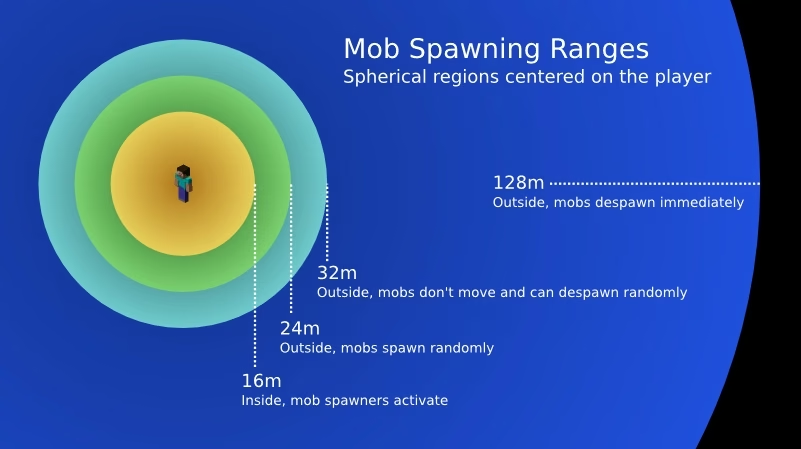
The mob-spawn-range value in spigot.yml is the chunk distance at which the server will attempt mob spawning.
If simulation-distance is more than 10, set mob-spawn-range to 8.
If simulation-distance is less than 8, ALWAYS set mob-spawn-range to -1 from simulation-distance! This will avoid 'ghost mobs', which are mobs that can't be despawned because the chunk they're in has entered the non-ticking or unloaded region. This will cause mobs on the server to become scarcer, because the new mob quota decreases (taken by mobs that failed to despawn).
You also need to change despawn-ranges from ELLIPSOID to CYLINDER, and hard horizontal to (simulation-distance)-1 * 16
More: Check the "Setelan Ajaib Lancar" page
Not Restarting the Server Daily
Restart your server every day (or periodically) to clean up various junk in the server's memory.
The best time to restart the server is 02:00-05:00 in the morning, when server activity is minimal. So your players aren't disturbed during peak hours that day.
Use the Scheduler function available in the pterodactyl panel to perform daily restarts automatically. If you don't use a panel for your server, you can create a cron job script task or use a plugin.
References:
PaperMC. Configuring Anti-Xray.
Last Edited: 13 December 2025.
Author: Jan Wafa Karsiena. License: CC BY-SA 4.0.
