Adding a Prefix to a Group
This guide explains how to add a prefix or rank to an existing group in the LuckPerms plugin, so it can be displayed in chat, the tablist, or the scoreboard.
Steps
1. Add a Prefix to the Group
Use the following command:
/lp group <group_name> meta addprefix <priority> "<prefix>"
Example:
/lp group admin meta addprefix 100 "&c[Admin] "
/lp group moderator meta addprefix 90 "&b[Mod] "
/lp group vip meta addprefix 10 "&a[VIP] "
2. Add a Weight (If it doesn't exist yet)
/lp group <group_name> setweight <number>
Example:
/lp group admin setweight 100
/lp group moderator setweight 90
/lp group vip setweight 10
Option 2: Using the LuckPerms Editor
If you prefer a web interface, use /lp editor:
1. Open the Editor
/lp editor
A link will appear in chat. Click it to open the editor in your browser.
2. Select a Group
Click the group you want to change, for example admin, moderator, or vip.

3. Enter the prefix into the group
Entering a prefix works just like entering a permission into a group, using the format
`prefix.<priority>.<prefix>`
Example:
prefix.10.&f[&cAdmin&7]&r

Then click Add at the bottom right, and once done it will look like this
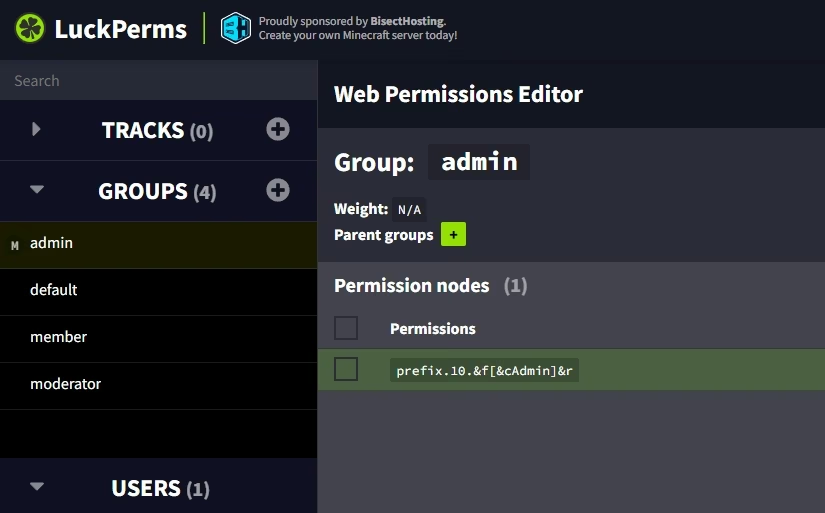
Once you're done, click Apply on the web editor to save.
Weight
Weight works as the dominant group, or you could call it the privilege, across all groups. For example
admin > moderator > vip > default
So the higher the weight a group has, the higher its priority.
Add weight via the luckperms web editor
It's the same as prefix, but by entering the permission weight.<number> Example:
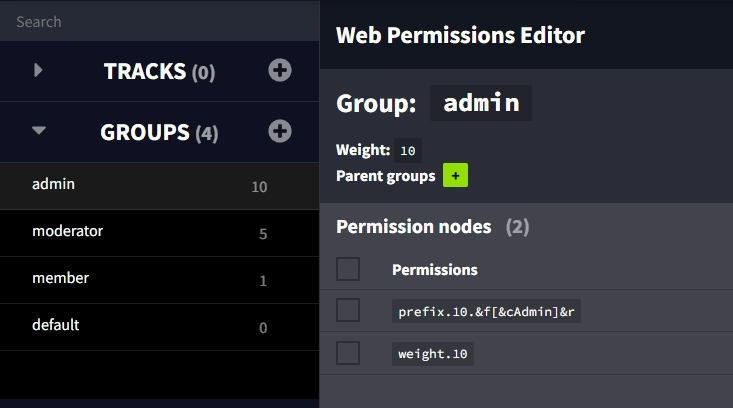
weight.10
Click Add then Apply if you feel it's correct. Once successful, a weight description will appear on each group.
 \
\
Troubleshooting
- Use
/lp user <name>info to view a player's metadata. - Make sure the chat, tablist, or scoreboard plugin you use supports LuckPerms metadata.
- If a player has more than one group, make sure the prefix priorities are set correctly.
Notes
- Use a space at the end of the prefix so it doesn't stick to the player's name.
- The higher the
<priority>number, the more dominant that prefix is if a player has multiple groups. - The higher the
weightnumber, the more dominant that prefix is if a player has multiple groups. - Prefix priority and weight don't have to be the same, but it's best to keep them consistent.
- Colors use the
&code (EssentialsX-style).